1.4. Playlist button:
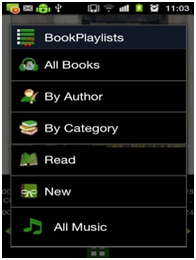
By clicking this button, Playlist window will pop up as shown in below figure. Multilevel playlists sorted by Author and by Category of books. Playlists can be sorted as in A-Z and Z-A order. Also New and Read playlists for quick access to latest Book files.
1.5. Sleep Timer button
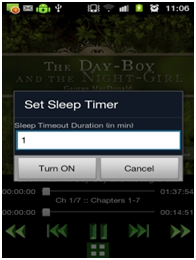
User can set Sleep Timer using this button. By clicking this button, Sleep Timer window will pop up as shown in below figure. Suppose user selects the timer value to 15 minutes, after 15 minutes, book player will stop automatically.
1.6. Variable Speed Playback ( VSP ) button:
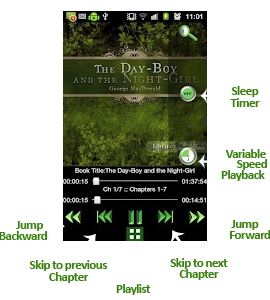
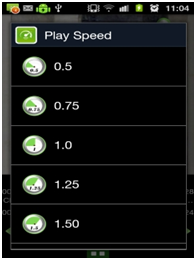
By clicking this button, Variable Speed Playback window will pop up as shown in below figure. User can change the speed of the currently playing speech or audio using this feature. User has to change the time scale value using time scale change bar and according to the changed time scale value speed of playback will be changed. Range of the time scale value is 0.5 to 2.0. Default value is set to 1.0.
1.7. Download Cover Art and Rotate Cover Art:
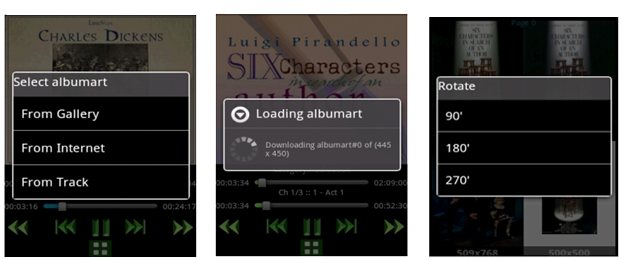
By long press on Cover Art, download cover art window will pop as shown in below figure. User can download cover art from Internet or from gallery or from book using this window. Picus Book player displays the cover art for each book and each chapter on the top of the screen. It displays the cover art from the book if available. If Book does not contain the cover art it gives user the options to set the cover Art from the media gallery or from internet. |